How to Add AI to Your Product Without Breaking Your Architecture
A practical guide to integrating AI as a modular layer without breaking your architecture.
Everyone wants AI in their product, but few know where to place it. A chatbot here, a recommendation engine there, maybe some automation layered on top — it all seems straightforward at first. And initially, it works.
But over time, the system starts to strain. Latency increases, costs grow, and behavior becomes less predictable. Suddenly, what was meant to be a simple “AI feature” begins to affect the entire product architecture.
According to McKinsey & Company, while AI adoption is accelerating across industries, most organizations struggle to scale it beyond isolated use cases due to integration and architecture challenges.
The problem is not AI itself. The problem is how it is integrated into the system.
Why This Is Hard
AI systems are fundamentally different from traditional software.
They are:
- probabilistic, not deterministic
- data-dependent
- resource-intensive
- constantly evolving
At the same time, your core product likely depends on:
- predictable behavior
- stable performance
- clear logic flows
This creates a mismatch:
AI introduces uncertainty into systems that require stability.
The Wrong Way
Most teams follow this pattern:
1. Bolt AI directly into core logic
Embedding models inside business workflows.
Result: tight coupling, hard to update.
2. Skip data architecture
Using whatever data is available.
Result: poor performance, unreliable outputs.
3. Optimize for demos, not systems
Focusing on visible features instead of infrastructure.
Result: impressive prototypes, fragile products.
4. Ignore observability
No way to track or explain AI decisions.
Result: loss of trust, especially in regulated industries.
The Right Way: AI as a Modular Layer
High-performing teams treat AI as a separate system.
Not a feature. Not a shortcut.
A module.
This aligns with modern AI engineering practices, where systems are built with clear separation between data pipelines, model layers, and application logic.
Step 1 — Define the Use Case Clearly
Before writing code, answer one question:
What does AI actually improve?
Examples:
- faster decision-making
- better recommendations
- fraud detection
- automation of repetitive tasks
According to Deloitte, successful AI implementations are tightly linked to measurable business outcomes — not just technical capabilities.
👉 If you can’t measure impact, don’t build it.
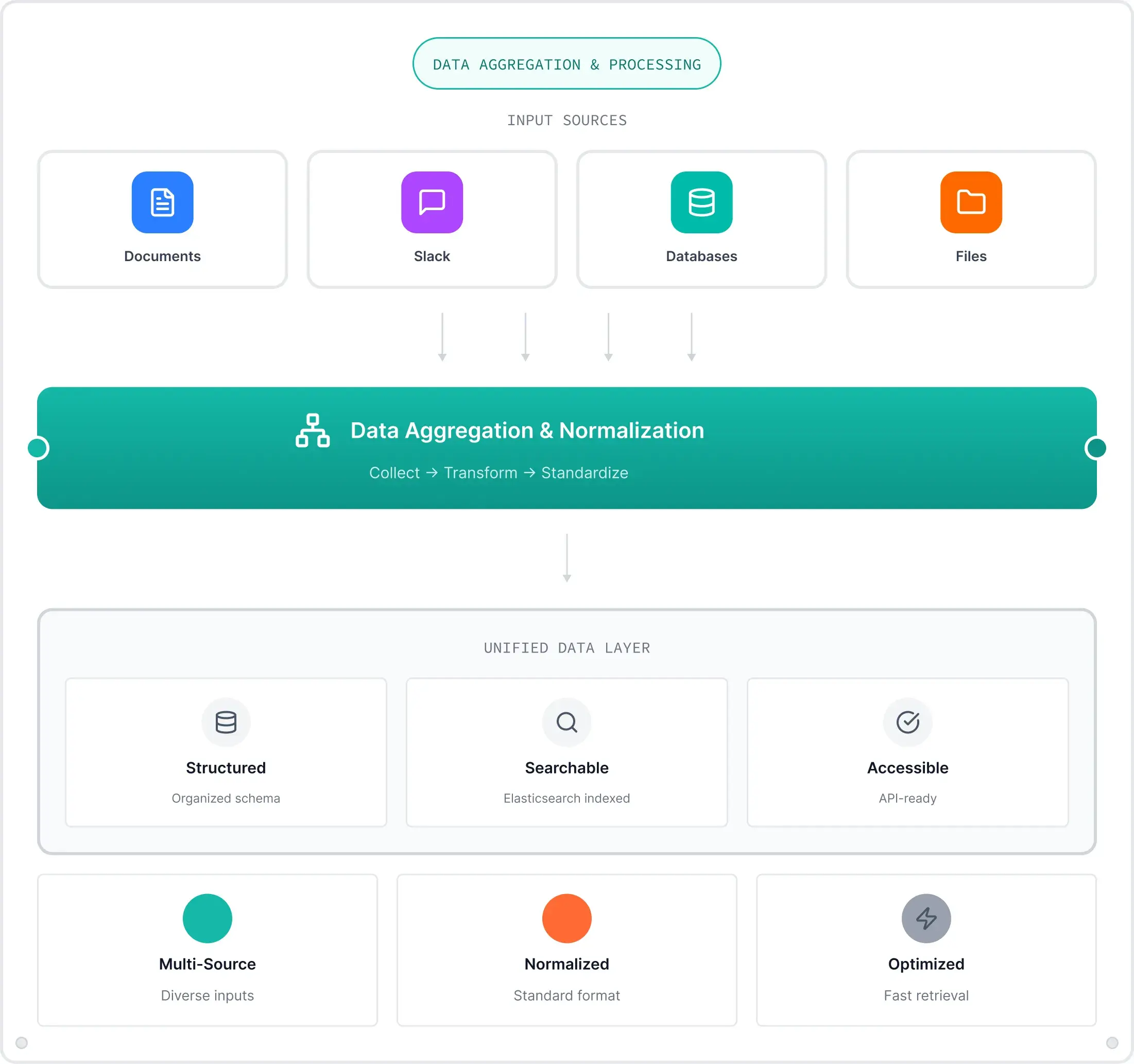
Step 2 — Build a Data Pipeline First
AI runs on data.
Without a proper data layer, models won’t work.
Your pipeline should include:
- data collection
- cleaning and validation
- storage
- processing
Modern AI systems rely on structured pipelines that ensure data quality and consistency across environments.
👉 Garbage in, garbage out — still applies.
Step 3 — Isolate the Model Layer
Keep AI models separate from your core application.
This means:
- expose models via APIs
- avoid embedding them directly into business logic
- allow independent updates
This architecture is common in modern AI platforms, where models operate as services rather than internal components.
👉 You should be able to update a model without redeploying your entire product.
Step 4 — Design for Observability
AI systems must be monitored.
Not just for performance — but for behavior.
You need:
- input/output tracking
- model performance metrics
- drift detection
- explainability tools
According to the World Economic Forum, transparency and explainability are critical for building trust in AI systems, especially in regulated sectors.
👉 If you can’t explain it, you can’t scale it.
Step 5 — Keep Humans in the Loop (When Needed)
Not all decisions should be automated.
In fintech and healthcare especially:
- approvals
- risk decisions
- critical recommendations
may require human oversight.
Modern AI systems often include human-in-the-loop workflows to balance automation and control.
👉 AI should assist — not replace — critical decisions.
Step 6 — Manage Costs and Performance
AI is expensive.
Compute. Storage. APIs.
Without control, costs scale faster than value.
Best practices:
- optimize inference usage
- batch processing where possible
- use lightweight models when appropriate
👉 Efficiency is part of architecture.
Step 7 — Integrate Gradually
Don’t rebuild your product around AI.
Start small:
- one feature
- one workflow
- one improvement
Measure impact.
Then expand.
This incremental approach aligns with how leading organizations scale AI — step by step, not all at once.
Real-World Pattern
Companies like Stripe and Shopify integrate AI as layers:
- fraud detection
- recommendations
- automation tools
But their core systems remain stable.
AI enhances the system — it doesn’t control it. Vibe coding is fun but limited.
Builder Takeaways
If you’re adding AI to your product:
- start with a clear use case
- build a strong data pipeline
- isolate models as services
- design for observability
- include human oversight where needed
- control costs from the start
- scale gradually
Most importantly:
AI should fit your architecture — not break it.
Final Thought
AI is not magic.
It’s just another brick.
A powerful one — but still part of a system.
At Unibrix, we build AI-powered products the same way we build everything:
- Modular systems.
- Clear architecture.
- Measured outcomes.
Serious software — built with the joy of play.
If you're adding AI to your product and want to do it without breaking your system — we can help you design it properly.

Moombix

Kennitalan

Wooskill
technical assessment,
and project scoping.
UI/UX design, and
technical specifications.
reviews, and continuous
integration.
testing, security audits,
and bug fixes.
documentation, and
ongoing support.