Back to Cases
#arrow-left

Unibrix

Engineering / Knowledge Base

#menu

Cases / Browser Tooling / Work Helper

BLOG_ARCHIVE

#logo
#close
Start building now
#arrow-right
Get in touch
#envelope
LET'S BUILD

Ready to start your project?

Tell us about your challenge. We'll engineer a solution that scales with precision.

We typically respond within 24 hours
Thank you! Your submission has been received!
Oops! Something went wrong while submitting the form.
PROJECT OVERVIEW

Work Helper

[ Web Time Tracker · Chrome Extension ]

A Chrome extension that builds a per-domain time log automatically — and dims the page when you need to read without distraction.

CATEGORY
Browser Tooling / Consumer Extensions
TIMELINE
2025
SCOPE
Chrome extension development
STATUS
● DELIVERED
SERVICES PROVIDED
#code-icon
Custom Software Development
#code-icon
Web Development
#code-icon
Extension Development
TECHNOLOGY STACK
TypeScript
Tailwind CSS
Chrome
01
STEP 01 — Project overview

Assembly Requirements

MODULE INVENTORY (5 COMPONENTS)

Work Helper is a Chrome extension that combines two productivity capabilities in a single popup: passive time tracking across all websites, and an on-demand reading mode overlay. A background service worker silently logs time spent on each domain as the user switches tabs and windows, accumulating a sorted leaderboard visible the moment the popup opens — no manual logging, no configuration.

The second feature injects a warm, translucent overlay onto any webpage with one click, reducing visual noise for distraction-free reading. The extension is built on Manifest V3 with three independently compiled entry points — popup, service worker, and content script — each handling a distinct responsibility.

Primary focus
#dot
Track time per domain automatically, with no setup or manual input
#dot
Persist time data across tab closures and browser restarts
#dot
Provide a focus overlay usable on any website in a single click
What we delivered
#dot
Background service worker tracking tab and window events in real time
#dot
Popup displaying a live, sorted time leaderboard from chrome.storage
#dot
Content script reading mode with warm overlay and pointer-events isolation
02
STEP 02 — CHALLENGES IDENTIFIED

Assembly Requirements

MODULE INVENTORY (5 COMPONENTS)
REQUIRED CAPABILITIES
A
#checked
Service Worker State Durability
MV3 background scripts are service workers Chrome can terminate at idle. The tracker holds activeDomain and startTime as in-memory variables. The windows.onFocusChanged handler flushes the running delta to chrome.storage.local the moment the browser loses focus — creating a checkpoint before the worker can be suspended mid-session.
B
#checked
Multi-Event Delta Attribution
Accurate time tracking requires handling three independent event types: tabs.onActivated (tab switch), tabs.onUpdated (in-tab navigation), and windows.onFocusChanged (app blur and focus). Each must flush the previous domain's elapsed delta and open a new timer without double-counting when events fire in rapid succession during normal browsing.
C
#checked
Isolated Context State
The popup and content script run in separate JS contexts with no shared variables. The popup fires a TOGGLE_READER_MODE message; the content script maintains its own enabled boolean and independently manages the overlay lifecycle — create if absent, remove if present. There is no shared state to sync on, so correctness depends entirely on each context tracking its own condition.
03
STEP 03 — ASSEMBLY PROCESS

Solution Architecture

SOLUTION APPROACH
MODULE 3.1
● Time Tracking Engine

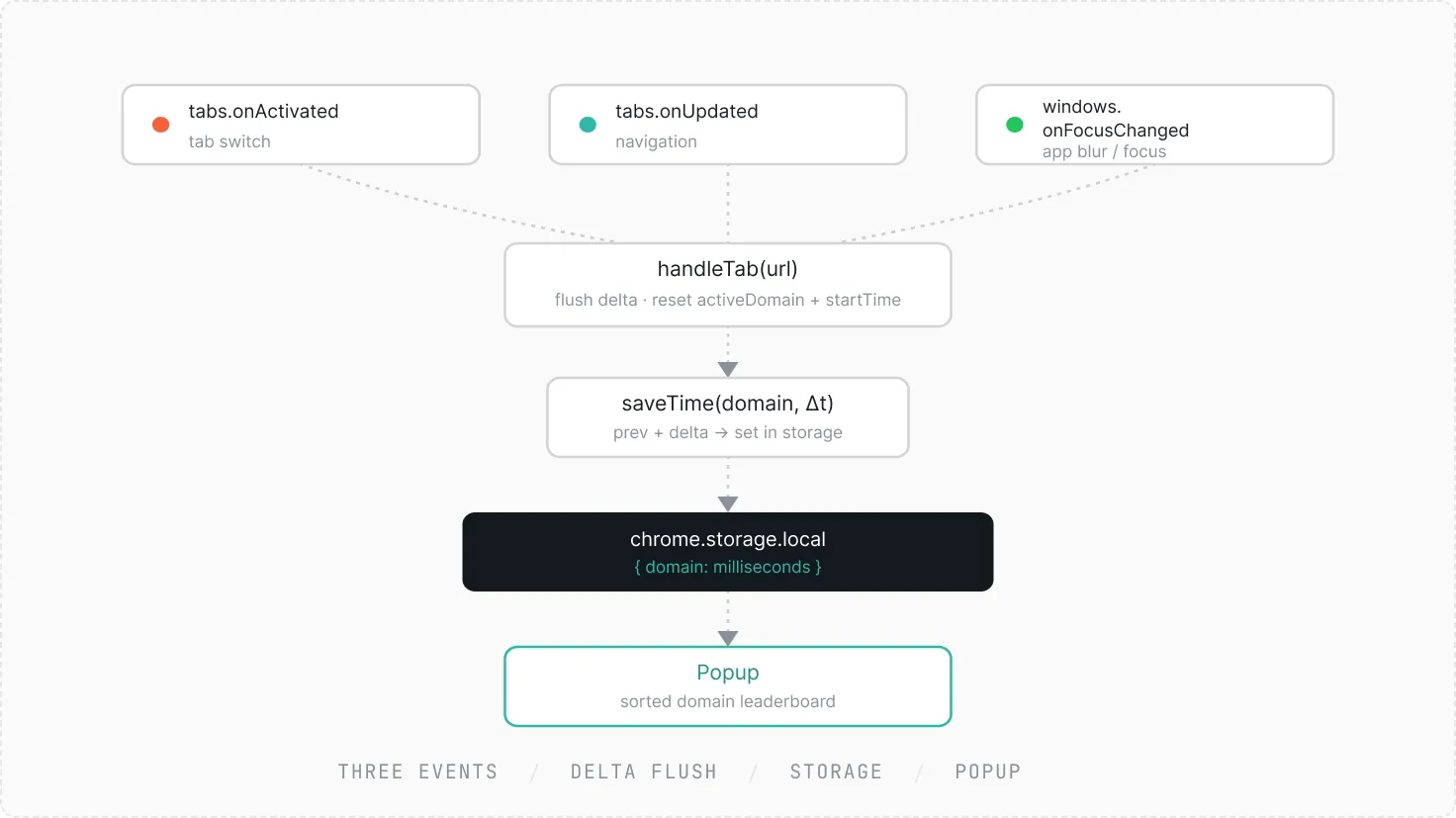
The time tracking engine lives entirely in the background service worker. It registers three event listeners — tabs.onActivated, tabs.onUpdated, and windows.onFocusChanged — each routing through a single handleTab() function. On every call, handleTab flushes the elapsed delta for the previous domain into chrome.storage.local as a keyed millisecond count, then resets the active domain and start timestamp for the next session.

The window focus handler is the critical edge case: when the browser loses focus entirely, there is no incoming tab event to trigger a flush. The WINDOW_ID_NONE branch commits the current delta immediately and sets startTime to null, so no phantom time accrues while the user is in another application. The popup reads all keys from storage and displays them sorted by accumulated time.

Flowchart showing three events (tabs.onActivated, tabs.onUpdated, windows.onFocusChanged) leading to handleTab(url), then to saveTime(domain, Δt), chrome.storage.local storing domain and milliseconds, and finally Popup displaying a sorted domain leaderboard.
MODULE 3.2
● Reading Mode

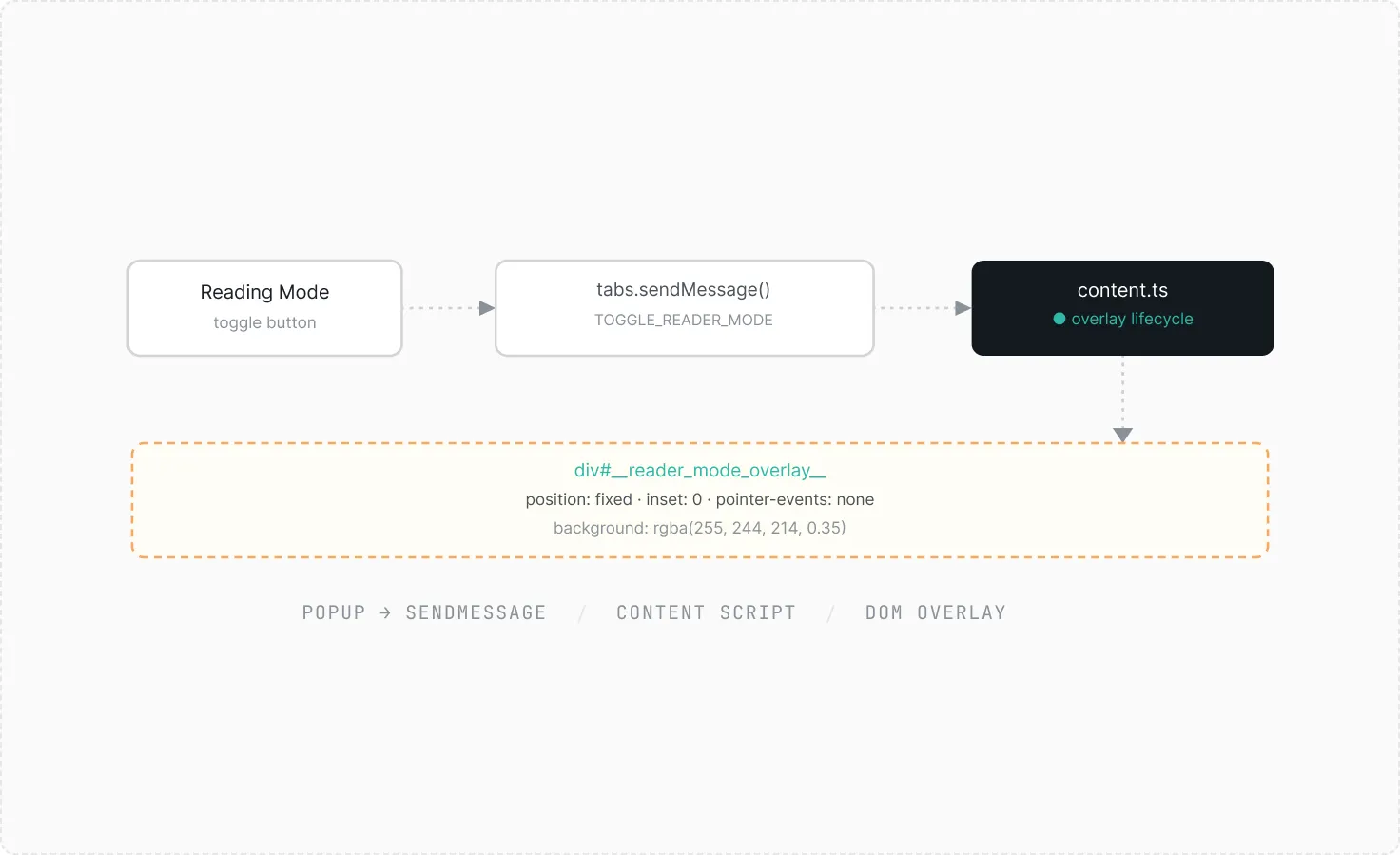
Reading mode is implemented in the content script as a lightweight DOM overlay. When triggered, the script creates a div with position: fixed, inset: 0, and pointer-events: none — spanning the full viewport without blocking any interaction with the underlying page. The warm background color (rgba(255, 244, 214, 0.35)) softens high-contrast pages while remaining subtle enough not to distort readability.

The popup dispatches a TOGGLE_READER_MODE message to the active tab via chrome.tabs.sendMessage. The content script maintains its own enabled boolean and responds by either appending or removing the overlay element. No state crosses the context boundary — each side owns its own truth.

Flowchart showing Reading Mode toggle button triggering tabs.sendMessage() with TOGGLE_READER_MODE, leading to content.ts overlay lifecycle updating a fixed-position div#_reader_mode_overlay_ with semi-transparent background.
04
STEP 04 — ASSEMBLY COMPLETE

Delivered Impact

MODULE INVENTORY (5 COMPONENTS)
Every site
tracked.
Zero config.
Coverage
Active from first install.
No opt-in needed.
Data survives
restarts
Persistence
Window blur checkpoints
prevent lost sessions.
Reading
overlay.One
click.
Focus
Warm filter, page stays fully interactive.
PERFORMANCE OUTCOMES
A
#checked
Tracks all websites automatically from first install
A
#checked
Time data persists across sessions via storage checkpoints
A
#checked
Reading mode works on any website without affecting interaction
A
#checked
Side panel opens via keyboard shortcut (Ctrl+Shift+O)
ASSEMBLY PHILOSOPHY
We don't just code.
We build systems.
Piece by piece,
designed to snap perfectly
into your vision.
#dot-circle
#dot-circle
#dot-circle
#dot-circle
Start building now
#arrow-right