Back to Cases
#arrow-left

Unibrix

Engineering / Knowledge Base

#menu

Cases / Consumer Health & AI / SnapNutrition AI

BLOG_ARCHIVE

#logo
#close
Start building now
#arrow-right
Get in touch
#envelope
LET'S BUILD

Ready to start your project?

Tell us about your challenge. We'll engineer a solution that scales with precision.

We typically respond within 24 hours
Thank you! Your submission has been received!
Oops! Something went wrong while submitting the form.
PROJECT OVERVIEW

SnapNutrition AI

[ BYOK AI CALORIE TRACKER FOR APPLE DEVICES ]

AN AI CALORIE TRACKER THAT RUNS ON THE USER'SOWN KEY, WITH NO BACKEND TO TRUST

CATEGORY
Consumer Mobile / AI Nutrition
TIMELINE
Through August 2026
COMPONENTS
iOS app, watchOS app, widgets, marketing site
STATUS
● DELIVERED
SERVICES PROVIDED
UX/UI Design
Back-end Dev
Product Ideation
Mobile Dev
AI Integration
Web Development
TECHNOLOGY STACK
WidgetKit
App Attest
OpenAI
GitHub Actions
SwiftUI
CloudKit
HealthKit
Cloudflare Workers
Google Gemini
Anthropic
OpenRouter
Google Analytics
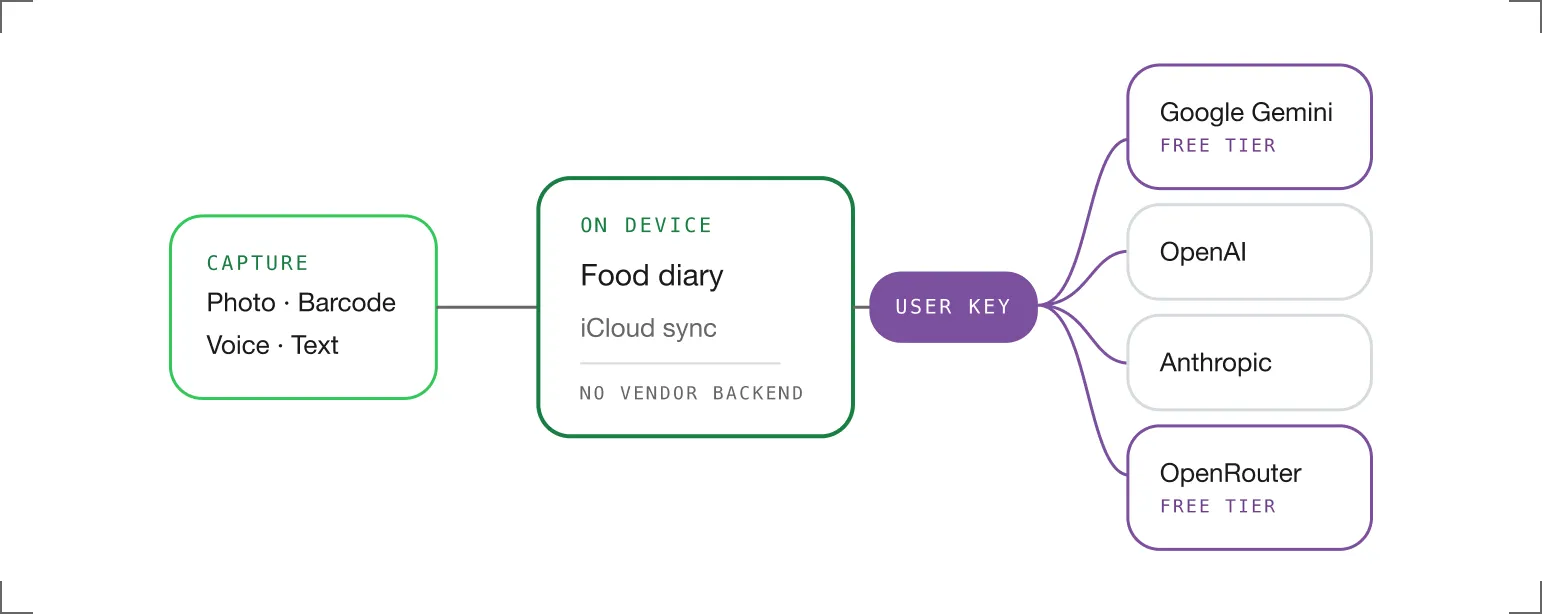
Flowchart showing data capture methods leading to an on-device food diary with iCloud sync and no vendor backend; user key connects to AI service options Google Gemini free tier, OpenAI, Anthropic, and OpenRouter free tier.
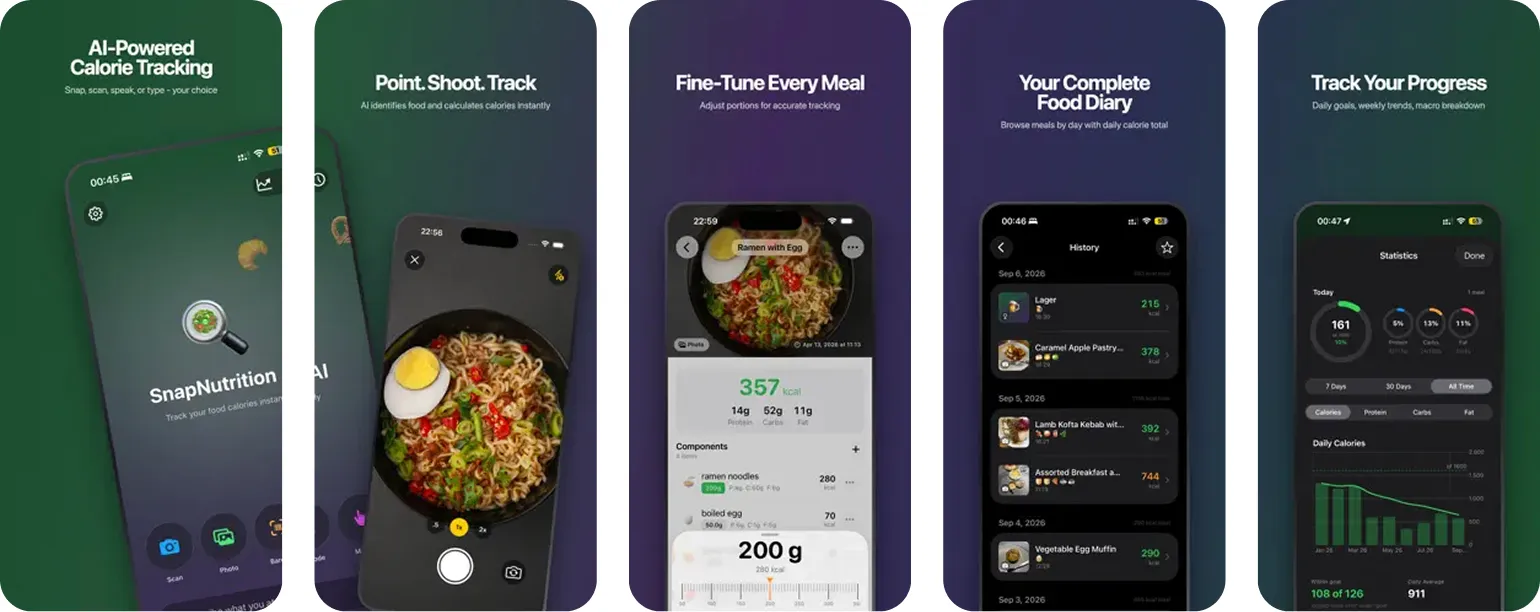
Five smartphone app screens showing features of an AI-powered calorie tracking app named SnapNutrition AI. Screens display: app home with scan, photo, and type options; food identification by camera with a picture of ramen and egg; meal portion fine-tuning with nutrition details for 357 kcal; a food diary with daily meal history; and progress tracking with daily goals, macro percentages, and calorie intake charts.
01
STEP 01 — Project overview

Assembly Requirements

MODULE INVENTORY (5 COMPONENTS)

SnapNutrition AI is a food diary for iPhone, iPad and Apple Watch. A photo, a barcode, a spoken sentence or a line of typed text becomes a calorie and macro estimate, stored on the device and synced through the owner’s personal iCloud account.

The category had settled on one shape. A photo calorie tracker asked for an account, charged a monthly fee, and routed every food photo through a backend the user had to take on trust. The subscription largely paid for model access the user could have bought directly.

Unibrix built SnapNutrition AI on the opposite default. The user supplies an API key from Google Gemini, OpenAI, Anthropic or OpenRouter, and the app talks to that provider directly. There is no SnapNutrition account, and in this mode no SnapNutrition server sits in the path at all.

Auto Mode was added afterwards for people who would rather not create a key. It is a paid convenience, priced at $2.99 per month or $29.99 per year, and it is the only part of the product that touches infrastructure Unibrix operates. Core tracking never sits behind it.
Primary focus
#dot
Removing the mandatory subscription from photo calorie tracking
#dot
Keeping the food diary on the device and out of a vendor backend
#dot
Making four AI providers interchangeable behind one capture flow
#dot
Reaching the diary from the wrist, the lock screen and Siri
What we delivered
#dot
iPhone and iPad app with photo, barcode, voice and text capture
#dot
watchOS companion with voice logging, macro rings and complications
#dot
Home Screen, Lock Screen and Control Center widgets
#dot
Auto Mode subscription served by a metered Cloudflare proxy
#dot
Marketing site with a machine readable mirror of every page
02
STEP 02 — CHALLENGES IDENTIFIED

Assembly Requirements

MODULE INVENTORY (5 COMPONENTS)
REQUIRED CAPABILITIES
A
#checked
Key custody
The provider key is entered once and held on the device. Requests go from the phone straight to Google, OpenAI, Anthropic or OpenRouter, so in BYOK mode there is no SnapNutrition server in the path that could log a key or retain a food photo.
B
#checked
Provider parity
Four providers return four different response shapes for the same photo. The app normalises them into one nutrition record, and marks which providers carry a free tier while the user is still choosing, so the decision does not require research first.
C
#checked
Estimate honesty
Photo estimation lands within roughly 10 to 30 percent depending on portion and preparation. The app states that range rather than hiding it, and every meal keeps editable portions and ingredients, so a wrong guess gets corrected instead of quietly logged.
D
#checked
Manual path
Manual entry makes no AI request at all. A user who already knows the numbers types them in offline, and barcode lookup covers packaged food, so the AI path is one option among several rather than a toll charged on every meal.
03
STEP 03 — ASSEMBLY PROCESS

Solution Architecture

MODULE INVENTORY (3 COMPONENTS)
MODULE 3.1
● COST ARCHITECTURE

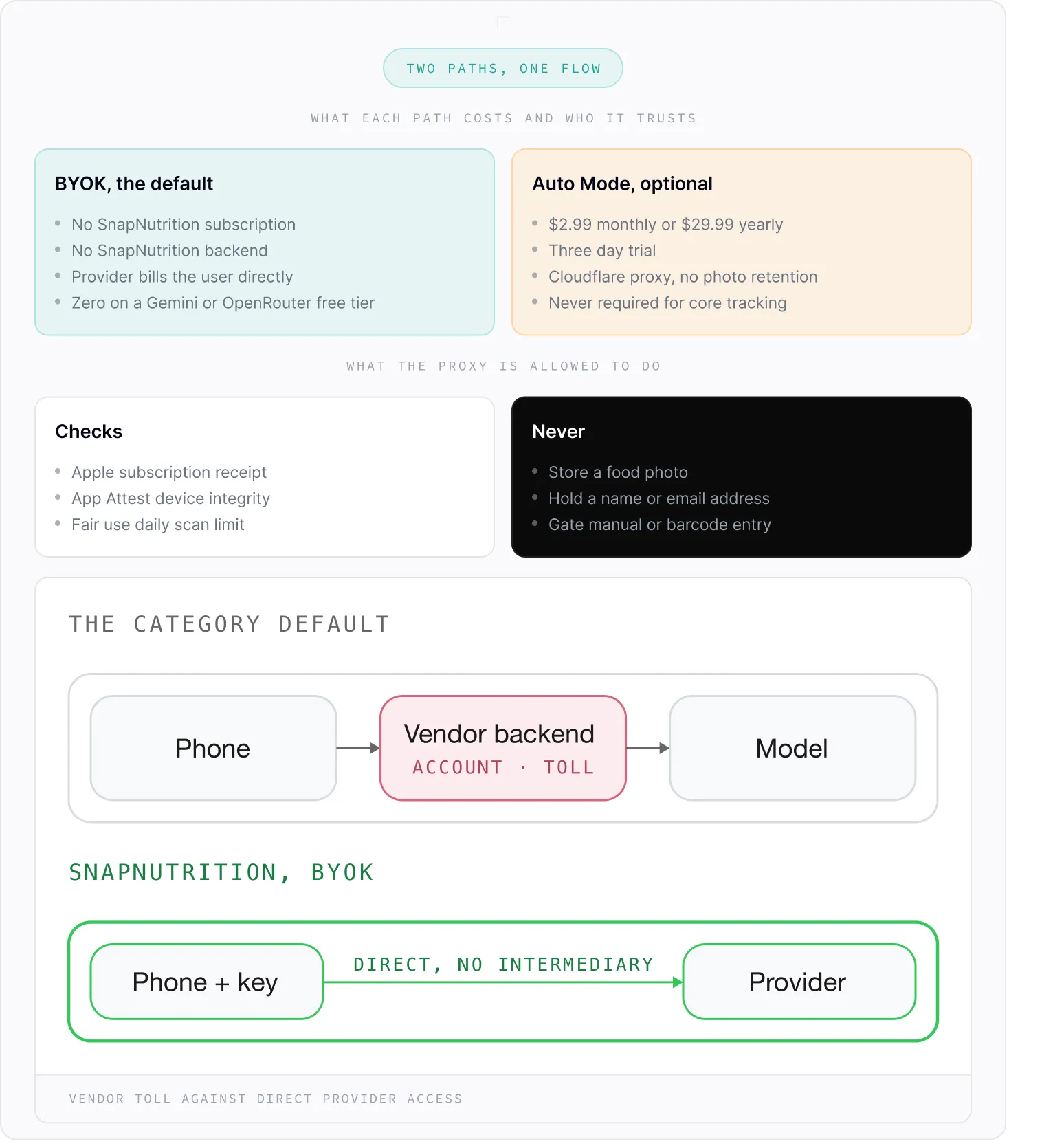
Two payment paths share one capture flow. In BYOK mode the user's own key reaches the provider directly and the bill arrives from Google or OpenAI rather than from SnapNutrition. Free tiers on Gemini and OpenRouter put the floor at zero.

Auto Mode is the alternative for users who do not want to create a key. At $2.99 per month or $29.99 per year after a three day trial, requests pass through a Cloudflare hosted proxy that checks the Apple subscription, runs App Attest for device integrity and enforces a fair use daily scan limit. Food photos are forwarded to OpenAI and not retained.

Diagram titled 'Two Paths, One Flow' comparing BYOK default and Auto Mode optional SnapNutrition setups. BYOK has no subscription, no backend, provider bills user directly, and zero cost on free tiers. Auto Mode costs $2.99 monthly or $29.99 yearly, includes a three-day trial, uses Cloudflare proxy with no photo retention, and is not required for core tracking. Proxy checks include Apple subscription receipt, App Attest device integrity, and fair use daily scan limit. Proxy never stores food photos, holds names or emails, or gates manual/barcode entry. Two flow diagrams show default path: Phone to Vendor backend (account toll) to Model; SnapNutrition BYOK path: Phone plus key directly to Provider, no intermediary. Footer notes 'Vendor toll against direct provider access.'
MODULE 3.2
● CAPTURE SURFACES

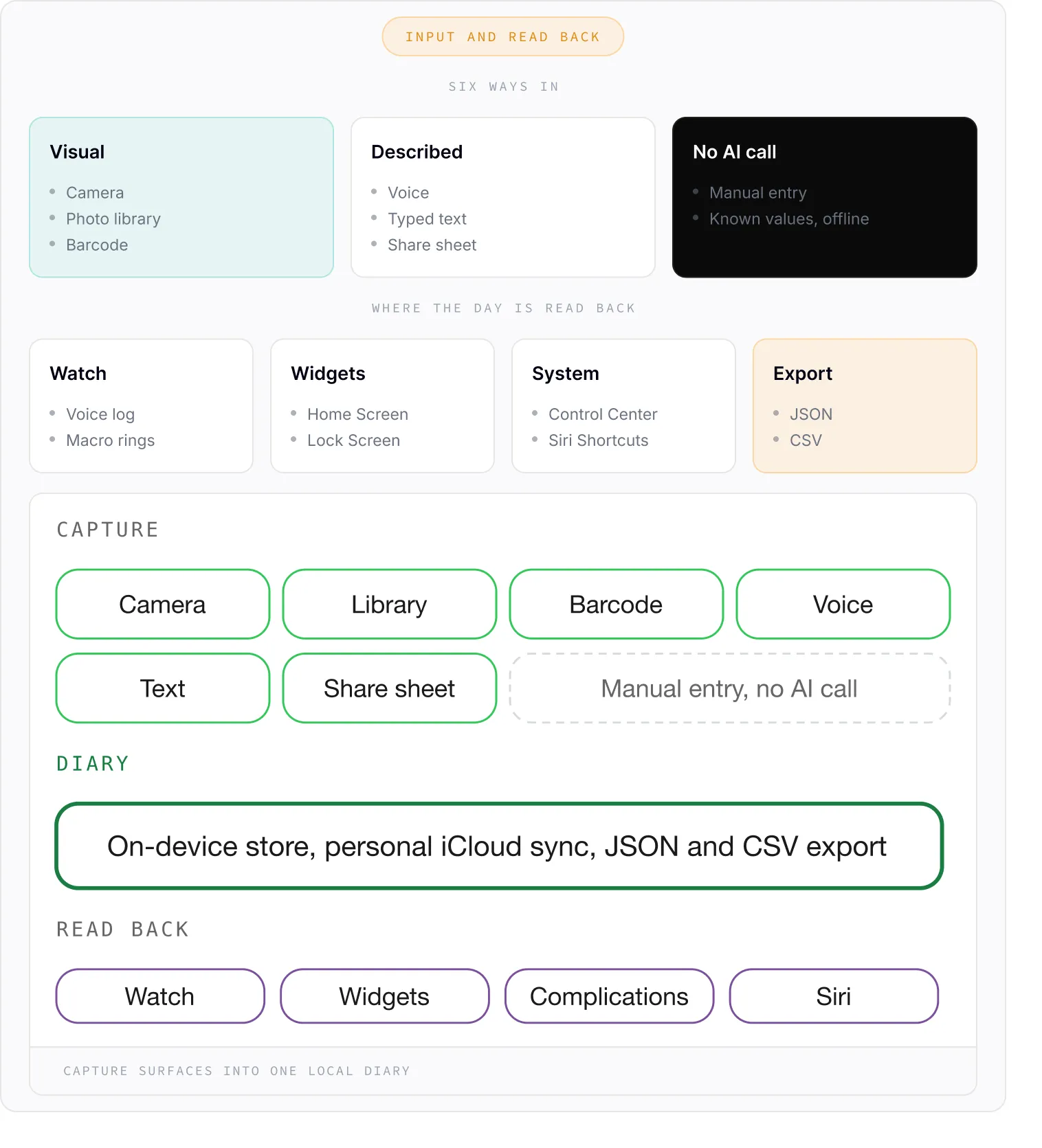
A meal reaches the diary through six surfaces. Camera and photo library cover cooked food, barcode lookup covers packaged food, voice and text cover the cases where a photo is awkward, and a share extension accepts an image handed over from any other app.

The Apple Watch app logs by voice and shows the day's calorie total with macro rings, and complications carry that total onto the watch face. Home Screen, Lock Screen and Control Center widgets hold goal progress and a quick action, and Siri Shortcuts cover the hands free cases.

The diary itself stays local, syncs through the personal iCloud account rather than a SnapNutrition one, and exports whole to JSON or CSV on request. Goal setting reads height, weight, age and activity, and can import those from Apple Health instead of asking twice.

Diagram showing six ways to input data: Visual (Camera, Photo library, Barcode), Described (Voice, Typed text, Share sheet), and No AI call (Manual entry, Known values offline). It shows where data is read back: Watch (Voice log, Macro rings), Widgets (Home Screen, Lock Screen), System (Control Center, Siri Shortcuts), and Export (JSON, CSV). Buttons below include options for Capture: Camera, Library, Barcode, Voice, Text, Share sheet, and Manual entry without AI call. Diary states on-device store, iCloud sync, JSON and CSV export. Read back options: Watch, Widgets, Complications, Siri. Caption says capture surfaces into one local diary.
MODULE 3.3
● AGENT READABLE WEB

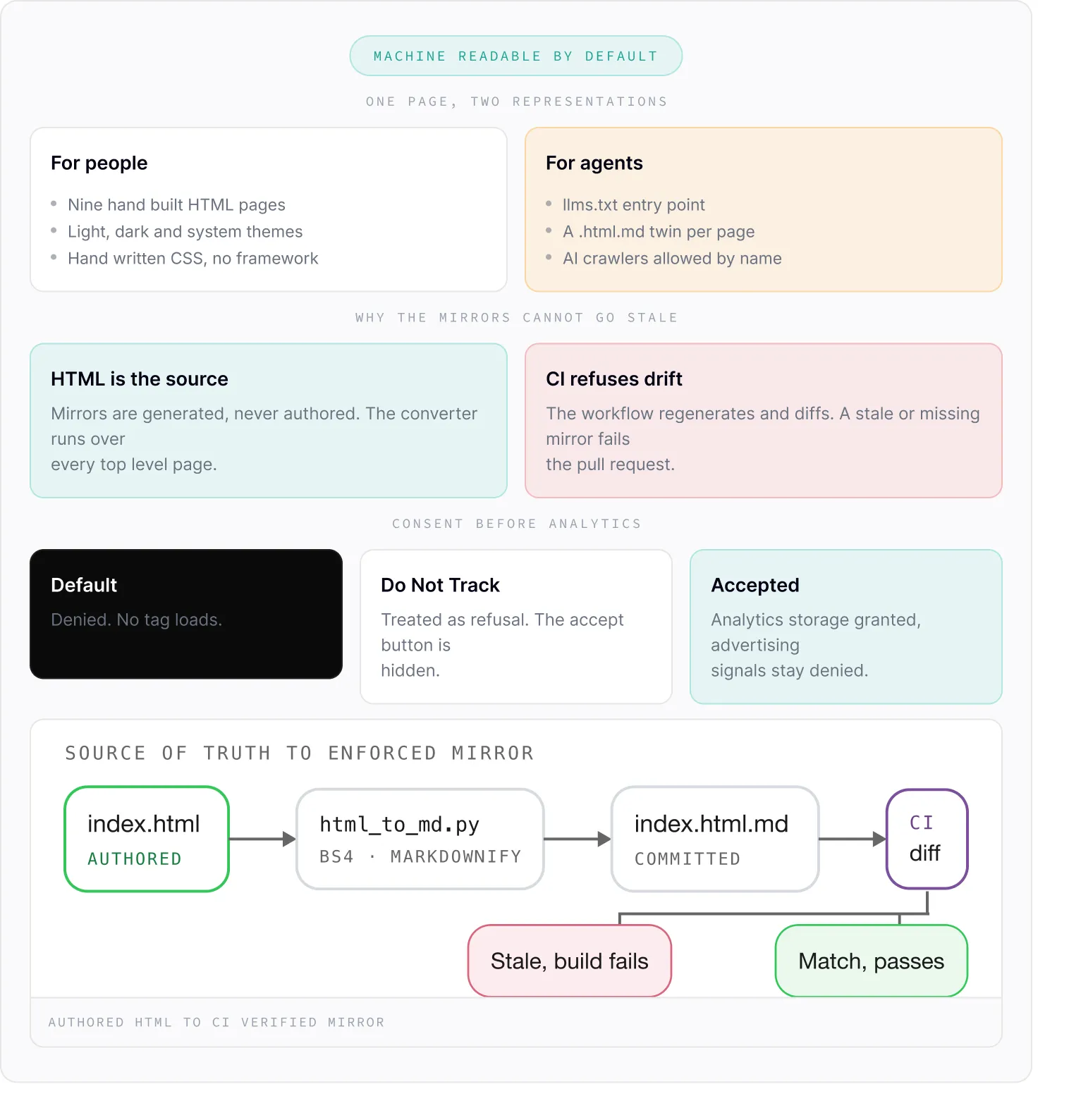
The marketing site is nine static pages on GitHub Pages, hand written CSS with light, dark and system themes switched by a data-theme attribute on the root element. The dark declarations are duplicated for the media query case, with a comment explaining that pure CSS cannot share them.

Every page carries a Markdown twin at the same URL plus .md, generated from the HTML by scripts/html_to_md.py using BeautifulSoup and markdownify, with llms.txt as the entry point and robots.txt admitting GPTBot, ClaudeBot and PerplexityBot by name. A GitHub Actions workflow regenerates the mirrors on every pull request and fails the build when a committed mirror has drifted from its source.

Analytics is gated twice. site.js loads Google Analytics only after an explicit accept, sets every consent signal to denied before granting the analytics one, and treats a browser Do Not Track header as a standing refusal that hides the accept button entirely.

Diagram titled 'Machine Readable by Default,' showing two representations on one page: For people — nine hand-built HTML pages, light/dark/system themes, handwritten CSS without framework; for agents — llms.txt entry point, a .html.md twin per page, AI crawlers allowed by name. Below, why mirrors cannot go stale: HTML is the source, mirrors generated never authored, converter runs every top-level page; CI refuses drift, workflow regenerates and diffs, stale or missing mirror fails the pull request. Under consent before analytics: Default denied no tag loads, Do Not Track treated as refusal and accept button hidden, Accepted grants analytics storage but denies advertising signals. At bottom, source of truth to enforced mirror flow: index.html authored to html_to_md.py using BS4 and Markdownify, then to committed index.html.md, then to CI diff, which results in either stale build fails or match passes.
04
STEP 04 — RESULTS

Delivered Impact

MODULE INVENTORY (5 COMPONENTS)
No Account
ARCHITECTURE
BYOK mode runs with no SnapNutrition
account and no SnapNutrition server.
The diary lives on the device and syncs
by personal iCloud.
4 Providers
AI ROUTING
Google Gemini, OpenAI,
Anthropic and OpenRouter are
interchangeable behind one
capture flow, and two of them
carry a free tier.
11 Languages
LOCALISATION
English, Ukrainian, Polish, French,
Spanish, German, Czech, Italian,
Finnish, Danish and Dutch, with metric
or imperial units.
PERFORMANCE OUTCOMES
A
#checked
Shipped an AI calorie tracker to the App Store with no mandatory subscription
A
#checked
Removed the vendor account and the vendor backend from the default path
A
#checked
Delivered capture across camera, barcode, voice, text, share sheet and Apple Watch
A
#checked
Automated a machine readable mirror of every marketing page, enforced by CI
A
#checked
Established a provider abstraction ready for models that do not exist yet
ASSEMBLY PHILOSOPHY
We don't just code.
We build systems.
Piece by piece,
designed to snap perfectly
into your vision.
#dot-circle
#dot-circle
#dot-circle
#dot-circle
START BUILDING NOW
#arrow-right