Back to Cases
#arrow-left

Unibrix

Engineering / Knowledge Base

#menu

Cases / Browser Tooling / Darkify

BLOG_ARCHIVE

#logo
#close
Start building now
#arrow-right
Get in touch
#envelope
LET'S BUILD

Ready to start your project?

Tell us about your challenge. We'll engineer a solution that scales with precision.

We typically respond within 24 hours
Thank you! Your submission has been received!
Oops! Something went wrong while submitting the form.
PROJECT OVERVIEW

Darkify

[ Chrome Browser Extension ]

A browser extension that inverts any webpage into dark mode — without washing out images or embedded media.

CATEGORY
Browser Tooling / Consumer Extensions
TIMELINE
2025
SCOPE
Chrome extension modification
STATUS
● DELIVERED
SERVICES PROVIDED
#code-icon
Custom Software Development
#code-icon
Web Development
#code-icon
Extension Development
TECHNOLOGY STACK
TypeScript
Tailwind CSS
Chrome
01
STEP 01 — Project overview

Assembly Requirements

MODULE INVENTORY (5 COMPONENTS)

Darkify is a Chrome browser extension that applies dark mode to any website with a single toggle. Rather than maintaining per-site CSS overrides, it injects a global CSS filter at the document root — invert(1) hue-rotate(180deg) — which darkens the entire page while correcting the hue shift a raw inversion would introduce on colored text and UI elements.

A complementary counter-filter targets img, video, canvas, and picture elements specifically, canceling the parent inversion so photos and embedded media render at natural color. Users tune brightness, contrast, and grayscale via sliders in the popup, with changes applied to the active tab in real time. Per-domain exceptions let specific sites stay in their original mode, persisting across sessions via chrome.storage.local.
Primary focus
#dot
Apply dark mode to any website without per-site configuration
#dot
Preserve image and video rendering through precise counter-inversion
#dot
Keep settings tunable and persistent across browser sessions
What we delivered
#dot
Chrome MV3 extension with content script and React popup
#dot
Two-layer CSS filter pipeline handling both inversion and media preservation
#dot
Real-time settings propagation via Chrome messaging and storage APIs
02
STEP 02 — CHALLENGES IDENTIFIED

Assembly Requirements

MODULE INVENTORY (5 COMPONENTS)
REQUIRED CAPABILITIES
A
#checked
Media Color Preservation
A page-level invert(1) cascades to every child element — including images and videos — turning photos into color negatives. The content script applies an identical invert(1) hue-rotate(180deg) counter-filter directly to img, video, canvas, and picture elements, precisely canceling the parent transformation without touching the darkened page background.
B
#checked
Two-Path Settings Sync
Slider adjustments in the popup need to appear on the active tab immediately — not after a reload. The extension dispatches live previews via chrome.tabs.sendMessage while simultaneously writing to chrome.storage.local, keeping the in-tab state and the persisted state consistent across both paths without either going stale.
C
#checked
Exception Timing on Load
The exceptions list must be evaluated both on initial page load and on every storage change. The content script reads the enabled flag and exceptions together with Promise.all, avoiding a race where a domain added mid-session would silently fail to apply until the next full page load.
03
STEP 03 — ASSEMBLY PROCESS

Solution Architecture

SOLUTION APPROACH
MODULE 3.1
● CSS Pipeline

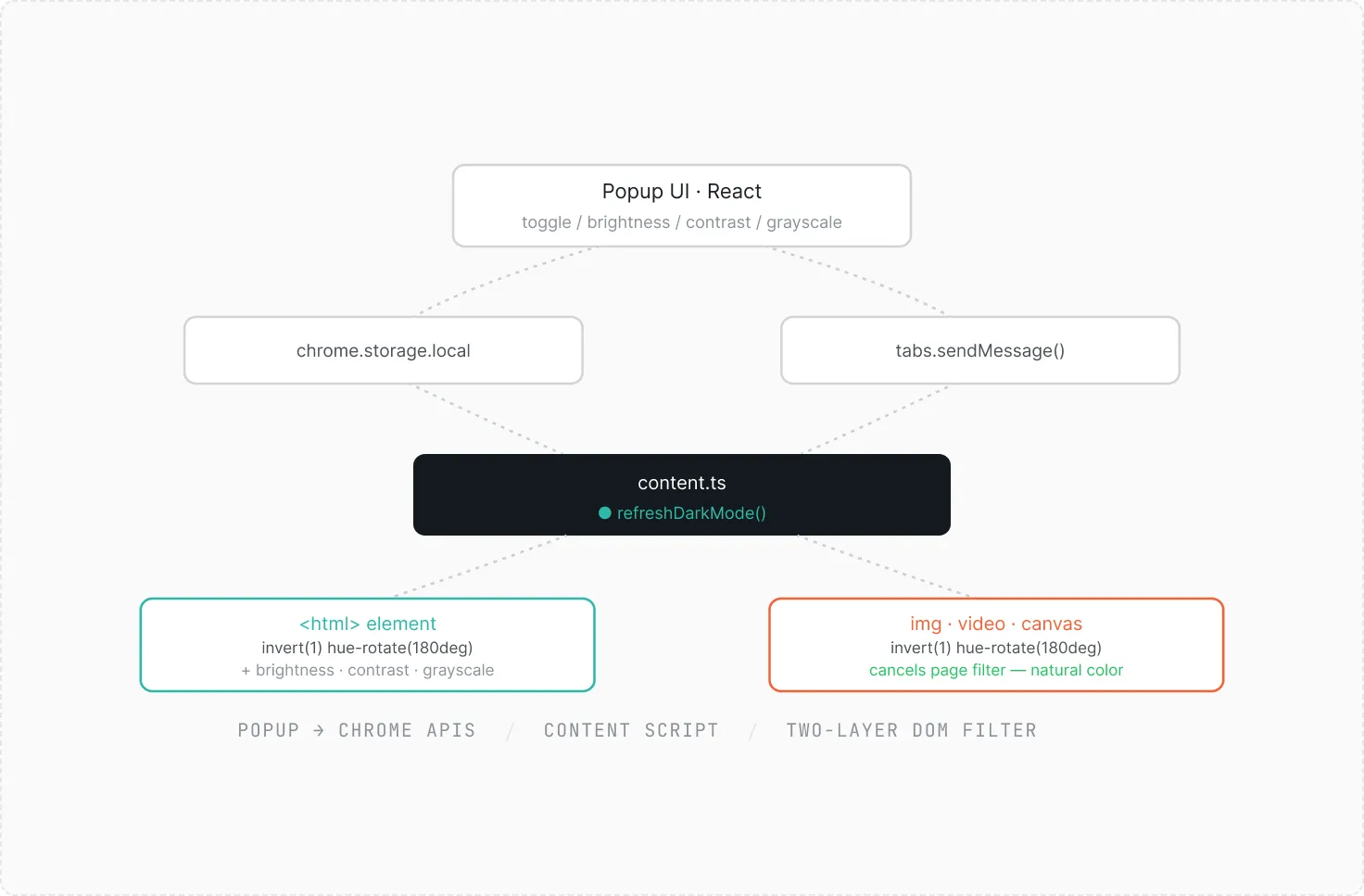
The core of Darkify is a two-layer CSS filter pipeline injected by the content script on every page. The first layer applies invert(1) hue-rotate(180deg) to the <html> element, combined with the user's brightness, contrast, and grayscale values — darkening the page and correcting hue shift in a single pass.

The second layer applies the same invert(1) hue-rotate(180deg) specifically to img, video, canvas, and picture elements. Because CSS filters compose multiplicatively down the DOM tree, applying the same transformation to a child cancels the parent's, restoring those elements to their original appearance without any JavaScript image processing.

Settings flow from the popup through two channels: chrome.tabs.sendMessage for live in-tab preview, and chrome.storage.onChanged for persistence across reloads. Both paths resolve through the same refreshDarkMode() function in the content script, so behavior is identical regardless of which path triggered it.

Flowchart showing Popup UI in React calling chrome.storage.local and tabs.sendMessage leading to content.ts with refreshDarkMode function, affecting HTML element and img, video, canvas elements with CSS filters for dark mode and natural color.
04
STEP 04 — ASSEMBLY COMPLETE

Delivered Impact

MODULE INVENTORY (5 COMPONENTS)
Works on any
website, zero
per-site rules
Coverage
A single content script handles the full
browser — no allowlists,
no per-domain CSS to maintain.
Images and
video preserved
at natural
color
Fidelity
Counter-inversion on media elements
cancels the page filter with zero
visual artifacts.
Settings tune
live, no page
reload
Responsiveness
Dual-path messaging keeps in-tab
preview and storage consistent
simultaneously.
PERFORMANCE OUTCOMES
A
#checked
Dark mode applies to every website by default with no per-site configuration required
A
#checked
Images, video, and canvas elements remain visually correct through precise counter-inversion
A
#checked
Brightness, contrast, and grayscale adjustments are visible on the active tab immediately
A
#checked
Domain exceptions and user settings persist across browser sessions via chrome.storage.local
ASSEMBLY PHILOSOPHY
We don't just code.
We build systems.
Piece by piece,
designed to snap perfectly
into your vision.
#dot-circle
#dot-circle
#dot-circle
#dot-circle
Start building now
#arrow-right